 ATmega1280: 4 KB of EEPROM Is Not a Small Flash
 September 15th, 2010 |
  Author:
 A hundred-pin microcontroller with 128 KB of flash, 8 KB of SRAM and 4 KB of EEPROM invites a comparison that is intuitively appealing and wrong: that the EEPROM is a small flash array, so the two can be treated as one memory of 132 KB. They cannot, and the reason is not the capacity. It is that they are addressed by different mechanisms, written by different mechanisms, and destroyed by different mechanisms.
Getting that distinction wrong in a recovery produces a file that looks complete and is not, and it usually happens at the exact moment when the data matters most.
Two spaces, two access paths
The flash array is read through the program counter during execution and through a pointer pair for constant data. The EEPROM is read through three registers: an address register pair, a data register, and a control register whose bits start an operation and report when it has finished.
| property | flash | EEPROM |
|---|---|---|
| size on this part | 128 KB | 4 KB |
| address space | program, word-addressed | data, byte-addressed |
| write unit | page | byte, with an internal erase-write cycle |
| write time | milliseconds per page | milliseconds per byte |
| endurance | tens of thousands of cycles | hundreds of thousands of cycles |
| erase as the unit | yes | no, the write includes the erase |
The last row explains why the EEPROM is the better place for a serial number. A flash page rewrite destroys the whole page; an EEPROM write touches one byte. A design that stores a counter and increments it once per hour would destroy a flash page in weeks and never wear out the EEPROM.
The write cycle is slow, and the code knows it
An EEPROM write takes milliseconds, which is an eternity for a 16 MHz core — tens of thousands of instruction cycles. Firmware cannot proceed to the next write until the current one completes, so every design contains a polling loop waiting on the busy flag, or an interrupt driven from the ready condition.
That polling loop is one of the more reliable landmarks in an unfamiliar image. It is tight, it reads the control register, it branches back to itself, and it appears wherever persistent data is written. Finding it locates the data-writing routines, and those routines are the ones that define the data layout.
The interrupt-driven variant is worth distinguishing. A design that enables the ready interrupt and writes from the service routine is one that decided the main loop could not afford the wait, which usually means the EEPROM is written from a state machine that also does something time-sensitive. That in turn suggests the data is being logged rather than configured.
Three reasons a byte reads as 0xFF
Erased is 0xFF. That single fact produces a class of misreading that is expensive because it looks like an answer.
A byte of 0xFF can mean the location has never been written since the part was manufactured, because the factory state is the erased state. It can mean the location was erased as part of a whole-device operation. And it can mean a write was interrupted, or a write failed, leaving the location in the erased state rather than holding either the old or the new value.
| reading | most likely cause | how to confirm |
|---|---|---|
| a block of 0xFF in an otherwise populated region | deliberate erase, or a write that never happened | check the surrounding record structure for a sequence gap |
| 0xFF at the very end of the array | never used | nothing to confirm; it is the expected state |
| scattered 0xFF inside a record | failed write | the record’s own checksum will disagree |
| the whole array 0xFF | erased device, or a read that returned nothing | read a known-non-blank location, or read the fuse bytes |
Distinguishing these requires structure, not more reading. If the data has records with sequence numbers or checksums, a gap and a checksum failure separate the cases immediately. If the data is a bare parameter block with no structure, the distinction may be unresolvable from the contents alone, and saying so is better than guessing.
What 4 KB actually holds
The size is large enough that the contents are not a handful of settings. On a part with this much EEPROM the array usually contains one of three things, and they read very differently:
- A parameter set with a header, a version byte and a checksum. Compact, often under a hundred bytes, and the rest of the array is erased.
- A rolling log. Records of fixed length walking through the array, each with an increasing sequence number or a timestamp, overwriting the oldest when the end is reached. The newest record is the answer a customer usually wants, and finding it means ordering by sequence rather than by address.
- A calibration table indexed by sensor or channel. Nearly full, with regularity across the array and values that vary smoothly between neighbouring entries.
The three are distinguishable at a glance in a hex dump, and telling the customer which one they have is often more useful than the dump itself, because it tells them what the device was doing.
Delivering it without merging it
The EEPROM contents belong in their own file. Merging them into the flash image destroys the address-space distinction and produces a file that no programmer can use correctly, since the two regions would be written to the same device through different mechanisms at different addresses.
The deliverable is therefore the flash image, a separate EEPROM image with its base address stated, the fuse and lock state as read, and a note describing the structure found in the EEPROM: header, record length, sequence field, checksum.
Where the design also keeps data in the flash array as constants, ATmega1280V program recovery covers the addressing that makes those reachable. The same three-way 0xFF ambiguity applied to a smaller data page is in ATtiny85V software recovery, and the erase interaction with protection in ATmega1280 flash recovery.
FAQ
Can the EEPROM be read while the flash is locked? Often yes, because the lock bits govern the flash array. The EEPROM has its own protection bit and it is frequently left unset.
Is the EEPROM erased by a chip erase? It depends on a fuse bit that decides whether the EEPROM is preserved through the erase. Read that bit before running one.
Why is the write so slow? The internal cycle performs an erase and a write per byte. The time is the physics of the floating gate, not a firmware inefficiency.
Conclusion
Treating a 4 KB EEPROM as a tail of the flash array produces a merged file that is useless and a data structure that is misread. Separated, it is the part of the device most likely to hold something irreplaceable: a serial number, a calibration, a log of what the unit did before it failed. Read it through its own registers, deliver it as its own file, and describe its structure in words.
ATmega640V: Wait States and the Voltage Squeeze on an External Bus
An external memory bus is a timing contract. The processor asserts an address, the external device takes some number of nanoseconds to drive data, and the processor samples it at a defined point. Everything about that contract is expressed in nanoseconds, and nanoseconds do not care what the supply voltage is — but the drivers do.
The V grade lowers the operating voltage. That makes the chip’s output drivers weaker and its input thresholds move, while the external device’s access time stays exactly the same. The margin that was comfortable at five volts becomes thin at three, and the part of the system that fails first is the one with the longest wire.
Why this matters for an examination
On a device with an external bus, a read that returns wrong data is ambiguous. It can be:
- The flash array, read incorrectly.
- The bus, sampled incorrectly.
- The external device, genuinely holding different data.
- The firmware, having configured the bus wrongly for its own voltage.
The last one is the interesting case, because it is a design decision preserved in the image. If the start-up code sets zero wait states on a bus that needed one, the product may have worked on the engineering bench at five volts and failed in the field at three. Recovering such a device means recovering a design that never fully worked.
The three knobs
| Setting | What it controls | Failure when too small |
|---|---|---|
| Wait states, low region | Extra cycles added before sampling | Data sampled while the bus is still settling |
| Wait states, high region | Same, for the upper window | Same, but only on external code fetches |
| Chip-select setup | How early the select asserts | The device sees a select and an address in the wrong order |
All three are register fields written in the first few dozen instructions of the start-up path. All three are invisible from outside the chip. All three are recoverable from a good image — which means an image read incorrectly can be misread as a firmware bug.
The order of diagnosis
Because a bus fault and a memory fault produce the same symptom, the diagnosis has to proceed from the outside inward:
- Supply measured at the die. Not at the bench supply. A part at the bottom of its range with a long ground return is already marginal before any bus activity begins.
- Signature read. If this fails, the interface is the problem, not the bus.
- Internal array read twice. If two reads agree, the internal path is trustworthy and any later anomaly belongs to interpretation, not transmission.
- Start-up block disassembly. Read the wait-state fields. A zero where the external part’s access time demands a one is an explanation, not a guess.
Step 3 is the one that separates the two halves of the problem, and it costs one extra pass.
What a marginal bus looks like in data
The characteristic signature is not random noise. It is a small number of bits that resolve differently depending on which access preceded them — the classic pattern of a bus that is sampled just before it settles. Address bit patterns follow data patterns, because the slowest transition is the one that changed most recently.
In a dump of internal flash this never appears, because the internal array is not on the external bus. It appears when the firmware’s own behaviour is being observed, or when external memory is being read through the part.
That is why an internal read can be perfect while the product misbehaves. The defect is in the board, not in the array.
Voltage and the erase threshold
One more interaction belongs here. The charge pump that performs chip erase draws current in bursts, and at the low end of the V range that current causes a supply dip. A dip during an erase can leave a page partially erased, which reads as a mixture of FF and residual values.
The check is trivial: after erasing, read the whole array and confirm it is uniformly FF before writing anything. On a V part this check is not optional — it is the only way to know that the erase, the supply, and the socket were all adequate at the same moment.
Why the grade exists at all
A battery product needs to keep running as the cell drains. The V grade makes that possible by extending the operating range downward, and the cost is paid in timing margin on every peripheral that has to meet a fixed external specification.
The external bus is the worst case for that trade, because the other end of the contract does not know or care about the supply. That is a design fact, not a defect — and on the bench it means the electrical envelope deserves more attention than the protection bits, at least until the data is trustworthy.
Related notes
- ATmega640 and the external memory interface — why part of the program may not be on the die.
- ATmega640PV and the low-voltage bus — the same trade in a different revision.
- ATmega324V and read margins — the same voltage logic without a bus.
FAQ
Do wait states affect internal flash reads? No. They apply to the external bus only. Internal array access is unaffected.
Can wait states be changed without recompiling? Only by changing the register value, which is written by code. There is no fuse for it.
Is a bus fault detectable from the image alone? No. The image tells you what was configured, not whether the configuration worked in the physical board.
Does the V grade reduce maximum clock frequency? Yes, at the low end of the supply range. That interaction is exactly why the timing margin shrinks.
Conclusion
On a part with an external bus, voltage and timing are one subject. The V grade widens the supply range and narrows the timing margin at the bottom of it, and the registers that compensate are inside the image. Reading the internal array correctly is the easy half; recognising a bus configuration that cannot work at its own supply is the half that explains the symptom.
ATmega640: When Part of the Program Is Not On the Chip
Most microcontrollers keep everything inside the package. This one does not. The external memory interface adds a bus that maps an address window to a device outside the chip — an SRAM, a parallel flash, a latch — and code can execute from that window.
That single feature breaks the assumption that a dump of the internal array is a dump of the program. It can be a complete program. It can be the first stage of a two-stage design. It can be a loader that copies everything else out of an external chip at boot and never returns to internal flash again.
What the interface actually adds
The bus exposes the usual signals: address lines, data lines, read and write strobes, and chip-select outputs. Access is controlled by registers that set the wait states for each of three regions, and the regions can be configured independently — one for external RAM, one for external peripherals, one for lower addresses where code may reside.
Because the regions are configurable, the same physical chip can be wired for data only, or for both code and data. The configuration lives in registers written at start-up, which means it is not a fuse setting and not visible from outside. Only the firmware knows what it configured.
That is the crux of the examination problem: the mapping that tells you where the program is, is itself inside the program.
Three shapes a device can take
Single-stage. All code in internal flash, external memory used purely as data RAM. A dump of internal flash is the complete program. This is the common case, and it is also the case where the interface has no effect on the recovery question at all.
Two-stage with an external code region. A small internal loader initialises the bus, then jumps into the external window. The internal image is real code and worth reading, but it is a fraction of the product’s logic — typically a bootloader plus a copy routine, and often the copy routine is the most informative thing on the chip because it reveals the external device’s geometry.
Data-only with structure. All code internal, but the external RAM holds tables that the code expects to find at known addresses. Recovering flash alone gives you an algorithm with missing constants; the device will not run and the disassembly will contain references to addresses that were never in the image.
| Shape | Internal image contains | External device holds |
|---|---|---|
| Single-stage | the whole program | data only |
| Two-stage | loader plus copy routine | the real code |
| Data-only | all code, missing constants | tables and buffers |
Distinguishing the three requires looking at the vector table and the start-up path. A reset vector that branches immediately to an address outside the internal range is the signature of the second shape. A start-up that configures bus registers before doing anything else is a hint at the third.
Reading the bus configuration out of the image
The configuration registers are written early, before any peripheral initialisation, because the stack may live in external RAM. In a disassembly that means the first few dozen instructions after the vector table are the highest-value region on the whole chip: they name the wait states, the region boundaries, and the chip-select assignment.
From that short block you can reconstruct the wiring without touching the board — which window the external device occupies, how many wait states were needed, and therefore roughly how fast the external part is. That is a lot of information from twenty instructions.
Why a partial image still has value
If the internal array holds only a loader, the honest description of the result is “a loader, not a program”. That sounds like a failure and usually is not, because the loader describes the rest of the system:
- The geometry of the external device: page size, address pins, command sequence.
- The verification method: whether a checksum or a signature is checked before the jump.
- The failure path: what happens when the external part does not respond.
Those three answer most of the questions a customer actually has — what protects the design, whether the external part is a standard component, and whether the product can be made to run a modified image.
What the protection bits do not cover
Lock bits protect the internal flash array. The external memory chip is a separate component with its own access rules — usually none at all, since parallel SRAM and flash have no notion of protection.
That asymmetry is worth stating plainly: on a two-stage design, the strong protection may be on the small internal loader while the bulk of the intellectual property sits on the bus in an unprotected part. Whether that is true for a given product is a board-level question, answered by looking at what is soldered next to the microcontroller.
Reading order
The sequence that produces a usable answer rather than a large file:
- Signature and fuses. Confirms the die and whether the interface is even enabled in the build.
- Lock byte. Determines whether internal flash is readable at all.
- Internal array, complete, with page-level verification.
- Vector table and the first two hundred instructions. Establishes the shape: single-stage or loader.
- If loader-shaped, extract the bus configuration and the external geometry from that block.
Steps 4 and 5 are cheap and they determine whether the remaining work is a disassembly job or a board-level job. Doing them before committing to either saves the more expensive mistake.
Related notes
- ATmega1280PV and the three-byte program counter — how a larger part changes what addresses mean.
- ATmega2561V and EESAVE — the variant with no external bus at all.
- ATmega644 and page buffers — the flash mechanics this part shares.
FAQ
Does the external interface have to be used? No. It is optional and many builds ignore it. The interface being present on the die says nothing about whether it is wired on the board.
Can lock bits hide the external memory? No. They apply to the internal array. The external component is a separate device with its own, usually absent, protection.
Is the bus configuration stored in a fuse? No. It is register state written by firmware at start-up, so it is only recoverable from the image or by observing the bus.
Does a partial internal image mean the read failed? No. It means the design is two-stage. The read succeeded; the program is simply distributed.
Conclusion
On a part with an external memory interface, “the program” is a property of the board, not only of the die. The internal image may be the whole thing, a loader, or a fragment that expects constants elsewhere. The vector table and the first block of start-up code tell you which, and they are the first thing worth reading after the lock byte.
 Posted in Recover Chip, Reverse Engineer Microcontroller |
  Tags: Reverse Engineering Microcontroller locked archive, reverse engineering microcontroller locked bin, Reverse Engineering Microcontroller locked code, reverse engineering microcontroller locked content, reverse engineering microcontroller locked data, Reverse Engineering Microcontroller locked eeprom, reverse engineering microcontroller locked file, Reverse Engineering Microcontroller locked firmware, reverse engineering microcontroller locked hex, Reverse Engineering Microcontroller locked information, Reverse Engineering Microcontroller locked memory, Reverse Engineering Microcontroller locked program |
  Comments Closed
ATtiny861V: The Internal Reference That Drifts With the Rail
Every ADC answer is a ratio: the input voltage divided by a reference. Change the reference and every reading changes with it, proportionally and silently. On a low-voltage part the available references include the supply itself, which by definition moves.
This is not a recovery problem in the narrow sense. It is the reason a recovered image can be byte-perfect and still produce a device that measures wrongly, and the reason a firmware’s constants have to be understood rather than copied.
The reference choices and what they imply
| Reference | Depends on supply | Typical use |
|---|---|---|
| Supply voltage | yes, directly | Ratio measurements, battery monitoring |
| Internal fixed reference | weakly | Absolute measurements |
| External reference on a pin | no | Precision work |
The first row is more common than it looks, because measuring the supply against itself is exactly how a battery monitor works: the reading is a ratio and the ratio is what matters. In that design, a drifting reference is not an error, it is the measurement.
The second row is where trouble appears. A firmware that switches to the internal reference to measure an absolute voltage assumes that reference is stable. It is more stable than the supply and it is not perfectly stable, particularly at the bottom of a low-voltage part’s range.
What this means for a recovered image
Two patterns appear in firmware that uses the ADC, and they have different implications:
Ratios throughout. The code compares a reading against a threshold expressed in counts. There is no absolute voltage anywhere, and the design is insensitive to the reference. Reproduction is straightforward because the constants are dimensionless.
Absolute values. The code converts counts to millivolts with a constant, then acts on the result. That constant encodes both the reference value and the divider ratio, and it is only correct at the reference the designer assumed.
Telling the two apart is straightforward: a ratio design has thresholds like 512 or 700, an absolute design has constants in the hundreds or thousands with a multiplication nearby.
Why the V suffix changes the arithmetic
A low-voltage part is specified to run down to a rail where a standard part stops. At that rail the internal reference may be at the edge of its specified accuracy, and the ADC’s own linearity degrades as the input approaches the rails.
A design built and validated at three volts and deployed at 1.8 is therefore working with a different error budget, even though nothing in the firmware changed. The constants are the same; the physics is not.
That is a real and frequently observed field failure, and it arrives as “the readings drift when the battery is low” rather than as anything resembling a software fault.
Reading the analogue path out of a dump
The analogue configuration is a handful of register writes, all of which appear early and all of which are identifiable:
- Reference selection.
- Prescaler, which sets the conversion clock and therefore the accuracy.
- Channel selection, which implies which pins are inputs.
- Conversion start and completion polling, which reveals whether the code blocks or uses an interrupt.
The prescaler is worth attention. An ADC clock that is too fast for the part’s specification produces readings that are noisy rather than wrong, and the noise looks like sensor behaviour. A recovered design with an aggressive prescaler is a design that traded accuracy for speed, and that is a fact about the product rather than about the recovery.
What a flash image cannot tell you
It cannot tell you what the reference actually was on the bench. The register setting says which source was selected; the accuracy of that source at that voltage and temperature is a property of the silicon, not of the code.
So a reconstruction that reproduces the code faithfully will reproduce the design’s intent, not its accuracy. If the product’s accuracy matters, the constants have to be re-derived against the actual reference — which is a measurement, not a disassembly.
Practical order
- Signature, fuses, lock byte.
- Array read, verified.
- Locate the analogue configuration block.
- Classify the design as ratio-based or absolute.
- If absolute, record the constant and the reference assumption as a pair.
Step 5 is the one that makes the reconstruction usable. A constant without its reference assumption is a number that will be copied into a design and be wrong by an amount nobody can calculate.
Related notes
- ATtiny861 and address spaces — where calibration tables are stored.
- ATtiny44V and clock fuses — the digital counterpart of this problem.
- ATmega324V and read margins — the same voltage sensitivity in the programming path.
FAQ
Is the internal reference accurate enough to rely on? It is specified to a tolerance that is adequate for many purposes and not for precision measurement.
Does the reference change with temperature? Yes, and the datasheet gives a curve rather than a single number.
Can a recovered constant be used as-is? Only if the reference it assumed matches the reference in the new design.
Why do readings drift as the battery drains? Because either the reference or the input divider is supply-dependent, or both.
Conclusion
The analogue path is where a faithful reconstruction most easily produces a wrong device, because the error is a ratio rather than a bug. Classifying the design as ratio-based or absolute, and recording each constant with the reference it assumed, is what keeps a byte-perfect image from becoming a product that measures confidently and incorrectly.
Posted in Reverse Engineer Microcontroller |
Tags: recover mcu locked archive, recover mcu locked bin, recover mcu locked code, recover mcu locked content, recover mcu locked data, recover mcu locked eeprom, recover mcu locked file, recover mcu locked firmware, recover mcu locked hex, recover mcu locked information, recover mcu locked memory, recover mcu locked program |
Comments Closed
ATtiny861: Three Address Spaces and Where Tables End Up
An AVR has three memories and three addressing schemes. Flash is word-addressed through the program counter and byte-addressed through a load instruction. SRAM is byte-addressed in a flat data space. EEPROM is byte-addressed through a separate index register and its own control block.
A constant table can be placed in any of the three, and the choice is a compiler and linker decision that leaves a distinctive trace. Knowing which space a table went to tells you whether a recovered image is complete or whether part of the data lives somewhere you have not read.
The three placements and their signatures
| Placement | How the code reads it | Survives power loss | In a flash dump |
|---|---|---|---|
| Flash | Load from program space | yes | present |
| SRAM, initialised at boot | Load from data space | no, copied at start-up | present once, as the copy source |
| EEPROM | Separate index register and control | yes | absent |
The second row is the subtle one. An initialised array in SRAM has to come from somewhere at start-up — either a copy loop that reads from flash, or a set of immediate stores. Both appear in the start-up path, and both mean the data is in the flash image twice: once as content, once as the code that installs it.
The third row is the one that catches people. A table placed in EEPROM is not in the flash image at all. A program that appears to be missing its calibration data may simply have it stored in the other array.
Reading the start-up path
The first few hundred instructions after the vector table are worth reading in full, because they establish how the device is wired:
- Stack pointer initialisation, which reveals how much SRAM the build expects.
- A copy loop from flash to SRAM, if initialised arrays exist. Its source and destination addresses describe the layout.
- Peripheral configuration, in the order the firmware enables things.
- Any read from EEPROM, which means the device depends on values that were written at the factory.
The fourth item is the important one. A start-up read from EEPROM means the firmware will not behave correctly on a blank part, and it means a recovered flash image alone cannot reproduce the product.
Why this matters for a reconstruction
A reconstruction that produces compilable code from a flash image will silently omit everything that lived in EEPROM. The code will compile, run, and read zeros from the EEPROM array, which for a calibration constant means a scale factor of zero and a product that reports nothing.
That failure looks like a bug in the reconstruction. It is actually a missing input, and it is resolved by reading the EEPROM as a separate step rather than by re-examining the disassembly.
The same logic applies to the fuse bytes: a reconstruction that omits them produces a device that does not start. Both omissions come from treating the flash image as the whole device.
The small-part advantage
On a part of this size, the three memories fit in a mental model. A few kilobytes of flash, a few hundred bytes of SRAM, a few hundred bytes of EEPROM. The copy loops are short, the register maps are short, and the whole program can be read rather than sampled.
That matters because manual reading catches things that automated analysis misses — an unusual constant, a table with a recognisable stride, a delay loop sized for a specific sensor. On a larger part, that kind of reading is impractical and the analysis has to be statistical.
The order that produces a complete picture
- Signature, fuses, lock byte.
- Flash array, verified page by page.
- EEPROM array, read separately, and recorded as its own artefact.
- Start-up path disassembly: stack, copy loops, peripheral order, EEPROM reads.
- Reconstruction of tables, noting for each whether it came from flash, SRAM initialisation, or EEPROM.
Step 5 is the deliverable that avoids the silent-zero failure, because it records provenance. A table with no recorded provenance is a table whose absence will not be noticed until the product is built.
Related notes
- ATtiny461V and the serial interface — the peripheral whose register map usually sits in one of these tables.
- ATtiny84 and complete images — completeness on a fully populated array.
- ATmega32PA and EESAVE — what happens to the third space during an erase.
FAQ
Is the EEPROM included in a flash dump? No. It is a separate array with separate addressing, and it must be read explicitly.
How do I tell a flash table from an SRAM one? By the access instruction and by the copy loop in the start-up path.
Does a start-up copy loop mean the data is duplicated? Yes. The initial values exist in flash and are copied to SRAM, so both copies are present in the image.
Can a reconstruction work without the EEPROM? It compiles and runs, and it will be wrong wherever a table came from EEPROM.
Conclusion
Three memories, three addressing schemes, and one common mistake: treating the flash image as the device. Recording where each table lives converts a reconstruction from something that compiles into something that reproduces behaviour — and it takes one extra read at the start rather than one painful discovery at the end.
Posted in Recover MCU |
Tags: recover mcu locked archive, recover mcu locked binary, recover mcu locked code, recover mcu locked content, recover mcu locked data, recover mcu locked eeprom, recover mcu locked file, recover mcu locked firmware, recover mcu locked heximal, recover mcu locked information, recover mcu locked memory, recover mcu locked program |
Comments Closed
ATtiny461V: The Shift Register Behind Every Serial Peripheral
Small AVRs economise on silicon by sharing peripherals. Instead of a dedicated SPI block and a dedicated two-wire block, this family has one universal serial interface: a shift register, a clock generator, and a counter, wired to three pins. What protocol it speaks is decided entirely by software.
For anyone reading a recovered image, that is good news. A bit-banged protocol is hard to identify from code alone; a shift register driven by a state machine is not. The instructions that load the data register, toggle the clock source, and count bits form a pattern that appears nowhere else in a small program.
What the hardware provides
Four pieces, each visible as a register in the code:
- A data register that holds the byte being shifted.
- A clock source selection: an internal timer, an external pin, or software.
- A counter that can generate an interrupt after a set number of edges.
- Pin direction control, which the firmware has to set correctly or nothing works.
Nothing in that list is protocol-specific. SPI is a mode where the counter runs to eight and a pin selects the slave. Two-wire is a mode where the firmware drives the clock manually and inspects the data line between edges to detect acknowledgement.
How the two protocols differ in code
| Aspect | SPI-like use | Two-wire-like use |
|---|---|---|
| Clock | Generated by the counter | Toggled by software, edge by edge |
| Bit count | Counter reaches eight | Loop counter, often unrolled |
| Error detection | None; a slave that is absent reads as FF |
Acknowledge bit examined after each byte |
| Code shape | Short, table-free | Longer, with a branch after every byte |
That last row is the giveaway. Two-wire code contains a conditional immediately after each byte, checking whether the other end pulled the data line low. SPI code has no such check because the protocol has no acknowledgement.
Finding a branch after every eight clock edges is close to proof that the firmware is speaking a two-wire protocol, and it identifies which device on the bus is the master.
Pin assignment is the next question
Once the protocol is identified, the pins follow: the shift register’s data and clock pins are fixed by the die, but which port pins they are multiplexed to is a design decision, and in a small package there may be only one option.
That matters for a device under examination, because knowing the pins means the bus can be observed with a logic analyser without guessing. On a device whose memory is closed, that observation is often the whole recovery: the protocol, the addresses, and the payloads are all on the wire.
What the code around the interface reveals
A serial interface is rarely alone. The code that uses it typically contains:
- A framing structure: a start condition, an address byte, a register index, a length.
- A register map: a table of offsets that corresponds to the peripheral being talked to.
- Timing constants: delays inserted to meet a setup or hold requirement.
The register map is the most valuable artefact. It is usually a table in flash, and its entries correspond one-to-one with the registers of whatever chip sits on the other side of the bus. That turns an anonymous protocol into a device-specific conversation.
The V suffix and the bus
The low-voltage grade extends the supply range downward, and a two-wire bus is sensitive to it. Pull-up resistors that work at five volts may be marginal at 1.8, and the rise time of an open-drain line is set by the resistor and the bus capacitance, not by the supply.
A device that works on a bench supply and fails in its product is often failing here rather than in the firmware. That is a design observation rather than a recovery one, but it explains a class of field failures that arrives as “the product sometimes cannot talk to its sensor”.
Reading order for a device with a serial bus
- Signature, fuses, lock byte.
- Full array read, verified page by page.
- Locate the shift register accesses: writes to the data register followed by clock manipulation.
- Determine protocol from the presence or absence of an acknowledgement branch.
- Extract the register map table and correlate it with the device on the bus.
Step 5 is what a customer usually wants, and it is obtainable even from a device whose memory could not be read — by observing the bus. That fallback is worth stating because on a locked part it is the only route, and it works.
Related notes
- ATtiny461 and instruction width — how the code around the interface is laid out.
- ATtiny861 and address spaces — where the register map table lives.
- ATtiny24 and high-voltage entry — access when the serial port is closed.
FAQ
Does this part have a hardware UART? No. Serial communication goes through the universal interface or through software.
Can the two protocols be told apart from a dump? Usually yes, by the acknowledgement branch after each byte.
Is the shift register usable for both at once? No. The firmware configures it for one mode at a time.
Does a locked device still drive the bus? Yes. The protection governs the programming interface, not the application.
Conclusion
A shared shift register makes serial code legible. The protocol is implied by the shape of the loop, the pins are implied by the register accesses, and the register map is usually a table in flash. On a device whose memory cannot be read, the same information is on the wire, which is why bus observation is a first-class method rather than a fallback.
Posted in Recover Chip |
Tags: recover mcu locked archive, recover mcu locked binary, recover mcu locked code, recover mcu locked content, recover mcu locked data, recover mcu locked eeprom, recover mcu locked file, recover mcu locked firmware, recover mcu locked heximal, recover mcu locked information, recover mcu locked memory, recover mcu locked program |
Comments Closed
ATtiny461: Relative Jumps Stop Reaching at Four Kilobytes
Instruction encoding is a budget. A relative jump on this architecture spends twelve bits on the offset, which reaches about two thousand words in each direction — four kilobytes of address space in total. That is fine for a small program and insufficient for one that grows past it.
The consequence is that a C compiler, once the image crosses the boundary, stops emitting relative jumps and starts emitting absolute ones. The generated code changes shape, and a disassembly read with a uniform assumption will look wrong in exactly the region where the program got big.
What the two forms look like
A relative jump is a single word: opcode plus offset. It is cheap, it is position-independent, and it cannot leave its window.
An absolute jump is two words: the opcode plus the target’s low bits, followed by the target’s high bits. It reaches anywhere in the address space and costs twice the space.
The distinction is visible in a dump without a symbol table, which is what makes it useful. A region full of single-word branches is a small, self-contained function. A region with two-word jumps is either a large function or a table of dispatch targets.
| Form | Size | Reach | Where it appears |
|---|---|---|---|
| Relative jump | one word | ±2K words | Most branches, loops, small functions |
| Absolute jump | two words | full space | Long branches, vector table, dispatch |
| Relative call | one word | ±2K words | Ordinary function calls |
| Absolute call | two words | full space | Calls across the boundary |
Why this misleads a disassembly
Start reading at the wrong offset and everything after is nonsense — that is true everywhere. The subtler problem is starting at the right offset and misjudging instruction length.
If a two-word jump is decoded as a one-word branch, the second word is read as the next instruction. It usually decodes as something plausible, because most 16-bit values decode as some instruction on a dense architecture. The reader then follows a control flow that does not exist, and the reconstruction drifts.
The cure is to check the opcode, not to guess from context. Two-word forms are identifiable from the first word alone; there is no ambiguity at the instruction level, only in a reader who is pattern-matching.
What the boundary means for structure
A 4 KB image that uses absolute jumps throughout is telling you something about how it was built: the compiler targeted a larger part, or the linker was configured for one. That is not a defect, and it does mean the code is larger than the source would suggest.
Conversely, a 4 KB image full of relative jumps is dense and probably hand-optimised or compiled with size optimisation. The two produce very different disassembly experiences, and knowing which you have sets expectations for how much of the image will be library code.
Where the vector table fits
Vectors are jumps, and on this part the reset vector is an absolute jump because it must reach the start of the application regardless of where that is. The interrupt vectors follow at fixed spacing, and each is either a jump to a handler or a placeholder.
Because an absolute jump occupies two words, the vectors consume more space than a reader expecting one-word entries would assume. The spacing is fixed and documented, so the table is a reliable anchor: count entries at the documented interval and they will line up.
Reading the image
- Read signature, fuses, lock byte before the array. A part configured for a missing clock will not run.
- Read the array twice, page by page, comparing.
- Disassemble from address zero and confirm the reset vector decodes as an absolute jump.
- Walk the vector table at the documented spacing and confirm each entry lands inside the application region.
- Only then follow code, checking instruction width at every branch.
Step 5 is where patience pays. Every two-word instruction decoded as one introduces an error that propagates, and there is no checksum downstream to catch it.
Related notes
- ATtiny461V and the serial interface — the peripheral whose code is easiest to recognise.
- ATtiny261 and the vector table — the same table on a smaller array.
- ATtiny861 and the three address spaces — where tables get placed.
FAQ
Can a relative jump reach the whole 4 KB image? Not from every position. The range is ±2K words, which covers 4 KB only from the middle.
Does the compiler always switch to absolute jumps past the boundary? It does when the target is out of range. Short functions can still use relative forms.
Is a two-word jump easy to confuse with two instructions? Only if the opcode is not checked. It is unambiguous at the instruction level.
Does this matter for a 2 KB part? Less. The whole image fits inside one relative window, so the mixed encoding rarely appears.
Conclusion
Instruction width is a structural property of an image, and on a part at the boundary between small and medium it varies within the same program. Checking the opcode rather than assuming a width is what keeps a reconstruction from drifting, and the vector table is the anchor that confirms the reading started in the right place.
Posted in Reverse Engineer Microcontroller |
Tags: Reverse Engineering Microcontroller locked archive, Reverse Engineering Microcontroller locked code, reverse engineering microcontroller locked content, reverse engineering microcontroller locked data, Reverse Engineering Microcontroller locked eeprom, reverse engineering microcontroller locked file, Reverse Engineering Microcontroller locked firmware, Reverse Engineering Microcontroller locked information, Reverse Engineering Microcontroller locked memory, Reverse Engineering Microcontroller locked program |
Comments Closed
ATtiny261V: Reading a Marginal Array Without Fooling Yourself
A read either succeeds or fails, except when it does neither. The interface completes, the buffer fills, and a handful of bytes are wrong in a way that is invisible until something downstream refuses to assemble.
On a low-voltage part the margin for that failure is narrower than on its standard sibling, and the mechanism is worth understanding because the fix is procedural rather than technical.
Why the margin exists at all
Three independent tolerances combine:
The target’s oscillator. The serial interface is synchronous, but the target samples on edges derived from its own clock. A slow oscillator eats sampling margin.
The supply. Sense amplifiers resolve a cell against a reference. A low rail narrows the difference they have to detect.
The programmer’s clock rate. Higher rates leave less time for the bus to settle before sampling.
None of the three is at its limit normally. Put all three near their limits at once and the result is bytes that resolve differently on consecutive reads.
The single test that catches it
Read every page twice and compare. That is the whole method, and it is sufficient because a marginal read is not stable — it depends on noise, temperature, and the exact timing of the preceding operation, none of which repeat identically.
| Two reads | Interpretation | Action |
|---|---|---|
| Identical | Margin adequate; treat as data | None |
| Differ in a few bytes | Margin inadequate | Lower clock, raise supply, retry |
| Differ everywhere | Interface fundamentally wrong | Check wiring and clock source |
| Second read empty | Entry lost between passes | Check reset line, socket contact |
The second row is the one that saves the most time, because the natural reaction to a single differing byte is to assume damage. It is almost always margin.
The compare must be per page
A whole-file comparison tells you the read was unstable. A per-page comparison tells you which page, and that localises the cause: one scattered page suggests a contact issue, a contiguous run suggests a supply sag during the middle of the session, and the last few pages suggest the supply collapsed at the end.
The pattern is more informative than the count, and it is free once the comparison is per page.
Erase, and the same margin problem
Erase loads the supply in a way reads do not. A charge pump drives the array, current is drawn in bursts, and at the low end of a V part’s range the rail dips.
The consequence is a partially erased page that no command reports. The check is to read the array back after the erase and confirm it is uniformly FF. That single step validates the supply, the socket, and the pump at the moment of peak load — the most demanding test available without instruments.
Skipping it means the first sign of trouble appears later, as a page that will not program correctly, with no record of why.
What to record with the image
A recovered image without context is a file. Four items make it evidence:
- The signature, which identifies the member and therefore the size of the map.
- The fuse byte, which explains clock behaviour and interface availability.
- The lock byte, which records the protection state as the hardware reported it.
- The number of pages that required a second read to verify.
The fourth is unusual and useful. It is a direct measurement of how marginal the session was, and it tells the next person whether to trust the file without re-reading.
The order that avoids rework
- Power at the design rail, measured at the socket, with local decoupling.
- Signature and fuses before memory.
- Lock byte.
- Page-by-page read, each page twice, logging any page that needs a retry.
- Post-erase verification if an erase is part of the plan.
Steps 2 and 3 cost seconds and answer the questions that determine whether steps 4 and 5 are even possible. Doing them last is the most common procedural error on a small AVR, and it is expensive because the conclusions drawn from an unverified image propagate.
Related notes
- ATtiny261 and the vector table — the structure that proves alignment.
- ATtiny461V and the same array — the larger part with identical mechanics.
- ATmega324V and read margins — the same physics on a bigger die.
FAQ
Is a single wrong byte a sign of a damaged die? Almost never. It is a sign of inadequate margin, and re-reading at a lower clock usually resolves it.
Does reading twice damage anything? No. Reads do not wear the array.
Why verify after an erase? Because erase is the operation that loads the supply most, and a partial erase is silent.
Can the margin be measured rather than assumed? Indirectly, by counting how many pages need a retry. That count is the measurement.
Conclusion
A marginal read is the most expensive failure because it looks like success. Comparing each page against itself, logging the retries, and verifying after any erase converts a silent risk into a recorded measurement — and on a low-voltage part, that record is the difference between an image that can be trusted and one that merely looks complete.
Posted in Recover Chip |
Tags: recover mcu locked archive, recover mcu locked bin, recover mcu locked code, recover mcu locked content, recover mcu locked data, recover mcu locked eeprom, recover mcu locked file, recover mcu locked firmware, recover mcu locked hex, recover mcu locked information, recover mcu locked memory, recover mcu locked program |
Comments Closed
ATtiny261: The Calibration Constants Are the Product
Most small microcontrollers are chosen for their pins or their price. This one is usually chosen for its converter: a ten-bit successive-approximation unit with a differential input stage and a selectable gain ahead of it, which lets a part that costs very little measure a bridge, a thermocouple or a shunt without any external amplifier.
That has a direct consequence for a recovery. The code in such a device is mostly plumbing — timer, serial port, a state machine — and the part that a competitor or a repair engineer actually wants is a small set of constants that convert raw counts into physical units. Those constants are not a secret algorithm. They are the product.
What the converter offers
The array is 2 KB, the SRAM and EEPROM are 128 bytes each, and the package has twenty pins. Within that budget the analogue side is unusually complete: eleven single-ended channels, differential pairs selected by the input multiplexer, two gain settings ahead of the converter, and an internal reference selectable in software.
| feature | setting | where it shows in the image |
|---|---|---|
| input selection | single-ended or differential pair | channel bits written to the multiplexer register |
| gain | unity or a high fixed gain | the same register, adjacent bits |
| reference | internal or an external pin | reference bits written during initialisation |
| conversion mode | single shot or free running | the enable and start bits in the control register |
The differential gain setting is the one worth understanding. A bridge output is a few millivolts sitting on a common-mode level of half the excitation, and unity gain would spend most of the converter’s range on the offset. The gain stage multiplies the difference before conversion, which is why a design can resolve microvolts with a ten-bit converter and why the same converter is useless for that job without it.
How a conversion sequence reads in assembly
The register-level pattern is short and repetitive: select the channel, start a conversion, wait for the completion flag, read the result register pair, and either use the value or accumulate it.
Two details distinguish a careful design from a rushed one, and both are visible after the fact. The first is whether the code discards the first conversion after a channel change. The sample-and-hold circuit needs time to settle when the multiplexer moves, and the first result after a switch is systematically wrong by an amount that depends on the source impedance. Designs that discard it read cleanly; designs that do not have a fixed offset on every channel change.
The second is whether the reference is allowed to settle. Switching the reference and converting immediately produces a first reading that is low, and on a device that samples once per second that error is invisible in testing and present in every unit.
The constants that carry the model
After the raw counts come the arithmetic. A conversion is turned into a physical value by an expression of the form offset plus gain times the count, sometimes with a second-order correction term, and on a part this small the arithmetic is fixed point because there is no floating-point unit and no room for a library.
That makes the constants readable. A sixteen-bit gain term, a signed offset, a shift count that implements the division — those three values state the sensor’s sensitivity, its zero point and the scaling the designer chose. For a bridge sensor the gain term is proportional to the excitation voltage and the gauge factor; for a thermocouple it corresponds to the Seebeck coefficient over the reference junction range; for a current shunt it is the reciprocal of the shunt resistance.
A disassembly that labels those constants is therefore more useful than one that labels the control flow, because the control flow is generic and the constants are specific to the product.
Averaging, and what it says about the noise budget
A single conversion on this converter has a noise floor set by the reference and the sample time. Designs that need better resolution do not change hardware; they average. The number of samples averaged appears in the image as a loop count, and the loop count states the designer’s noise budget directly.
Four samples buys one bit. Sixteen buys two. A design averaging sixty-four conversions per reading is telling you that it needed three more bits than the converter could give and was willing to spend the time. That number also predicts the sample rate, which is often the specification the customer cares about and never has documentation for.
| samples averaged | resolution gained | typical use |
|---|---|---|
| 1 | none | monitoring a supply rail |
| 4 | 1 bit | a slow temperature reading |
| 16 | 2 bits | a bridge with moderate precision |
| 64 or more | 3 bits or more | a scale or a precision instrument |
What the deliverable contains
For a code-level recovery the return set is the flash image, the EEPROM as a separate file, the fuse and lock state as read, a disassembly with the converter configuration annotated, and — the part customers use — a table of the calibration constants with the arithmetic they feed, written out as an equation that reproduces the device’s output from a raw count.
That last item is often the whole engagement. A customer with a failed unit and no source code does not need the state machine; they need to know what the number on the display means.
The wider vector table of this part’s larger sibling is covered in ATtiny261 vector table notes, and the marginal-array read problem in ATtiny261V code recovery. For a device where the analogue front end is external and the constants therefore live in a separate part, see ATtiny4313 code recovery.
FAQ
Is the gain stage internal? Yes, it sits ahead of the converter and is selected through the same register that chooses the input pair.
Why discard the first conversion after a channel change? The sample-and-hold needs to settle. The first result after a multiplexer change carries an error proportional to the source impedance.
Can the calibration constants be recovered without the code? They can be measured from the device by applying known inputs, but reading them from the image is faster and exact.
Conclusion
On a converter-centric part the firmware is mostly scaffolding and the value is in a handful of numbers. Reading the multiplexer configuration says what is measured; reading the averaging count says how precisely; reading the gain and offset constants says what the numbers mean. Those three together reconstruct the product’s measurement model without needing a single line of the original source.
Posted in Break IC |
Tags: break ic source data, break ic source eeprom, break ic source file, break ic source firmware, break ic source heximal, break ic source information, break ic source memory, break ic source program |
Comments Closed
Recover MCU ATtiny4313A Code
Recover MCU ATtiny4313A Code from embedded memory, the tamper resistance system of microcontroller attiny4313a will be unlocked and code include flash program and eeprom data will be extracted from attiny4313a memory;
The ATtiny2313A/4313 provides the following features: 2/4K bytes of In-System Programmable Flash, 128/256 bytes EEPROM, 128/256 bytes SRAM, 18 general purpose I/O lines, 32 general purpose working registers, a single-wire Interface for On-mcu Debugging, two flexible Timer/Counters with compare modes, internal and external interrupts, a serial programmable USART, Universal Serial Interface with Start Condition Detector, a programmable Watchdog Timer with internal Oscillator, and three software selectable power saving modes.
The Idle mode stops the CPU while allowing the SRAM, Timer/Counters, and interrupt system to continue functioning. The Power-down mode saves the register contents but freezes the Oscillator, disabling all other mcu functions until the next interrupt or hardware reset.
In Standby mode, the crystal/resonator Oscillator is running while the rest of the device is sleeping. This allows very fast start-up combined with low-power consumption. The device is manufactured using Atmel’s high density non-volatile memory technology before attacking Mcu protection.
The On-mcu ISP Flash allows the program memory to be reprogrammed In-System through an SPI serial interface, or by a conventional non-volatile memory programmer.
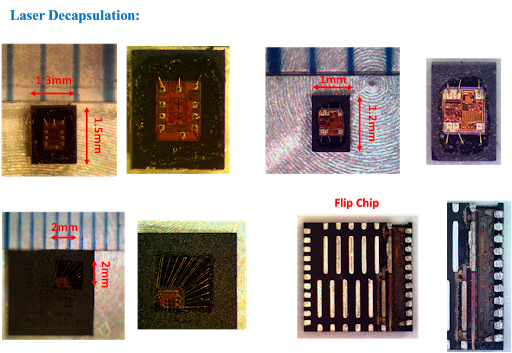
By combining an 8-bit RISC CPU with In-System Self-Programmable Flash on a monolithic mcu, the Atmel ATtiny2313A/4313 is a powerful microcontroller that provides a highly flexible and cost effective solution to many embedded control applications.
The ATtiny2313A/4313 AVR is supported with a full suite of program and system development tools including: C Compilers, Macro Assemblers, Program Debugger/Simulators, In-Circuit Emulators, and Evaluation kits.
This documentation contains simple code examples that briefly show how to use various parts of the device. These code examples assume that the part specific header file is included before compilation. Be aware that not all C compiler vendors include bit definitions in the header files and interrupt handling in C is compiler dependent before attack st62t15c6 Mcu firmware.
Please confirm with the C compiler documentation for more details.
For I/O Registers located in the extended I/O map, “IN”, “OUT”, “SBIS”, “SBIC”, “CBI”, and “SBI” instructions must be replaced with instructions that allow access to extended I/O. Typically, this means “LDS” and “STS” combined with “SBRS”, “SBRC”, “SBR”, and “CBR”.
Note that not all AVR devices include an extended I/O map.
For compatibility with future devices, reserved bits should be written to zero if accessed. Reserved I/O memory addresses should never be written.
I/O Registers within the address range 0x00 – 0x1F are directly bit-accessible using the SBI and CBI instructions. In these registers, the value of single bits can be checked by using the SBIS and SBIC instructions.
Some of the status flags are cleared by writing a logical one to them. Note that, unlike most other AVRs, the CBI and SBI instructions will only operate on the specified bit, and can therefore be used on registers containing such status flags.
The CBI and SBI instructions work with registers 0x00 to 0x1F only;
When using the I/O specific commands IN and OUT, the I/O addresses 0x00 – 0x3F must be used. When addressing I/O
Registers as data space using LD and ST instructions, 0x20 must be added to these addresses.
Posted in Recover Chip |
Tags: recover mcu source archive, recover mcu source binary, recover mcu source code, recover mcu source content, recover mcu source data, recover mcu source eeprom, recover mcu source file, recover mcu source firmware, recover mcu source heximal, recover mcu source information, recover mcu source memory, recover mcu source program |
Comments Closed